If you’re searching for how to reset FYP TikTok, you’re essentially looking to restart what the For You Page (FYP) recommends.
TikTok’s For You Page (FYP) is the platform’s primary recommendation feed, making it a critical channel for content discovery, trend tracking, and competitive visibility.
When your FYP becomes stagnant or misaligned with your business objectives, it can severely limit your ability to spot trends, analyze competitors, and identify potential customer segments.
Social media success demands adaptability, and your TikTok strategy is no exception.
A well-calibrated FYP can make content research faster by surfacing more relevant creators, formats, and trends, especially when you consistently engage with content that matches your niche.
Understanding how to reset and optimize your FYP isn’t just about seeing different content. It’s about transforming TikTok into a powerful business intelligence tool that drives real results.
This strategic guide reveals proven techniques for resetting your TikTok FYP, from leveraging official platform settings to implementing advanced optimization methods.
You’ll discover data-driven approaches to retraining the algorithm, practical steps for maintaining relevance, and expert insights for avoiding common pitfalls that can derail your social media strategy.
Master these techniques to ensure every moment spent on TikTok directly contributes to your business growth and market understanding.
How to Reset FYP (TikTok Algorithm) in Under 1 Minute
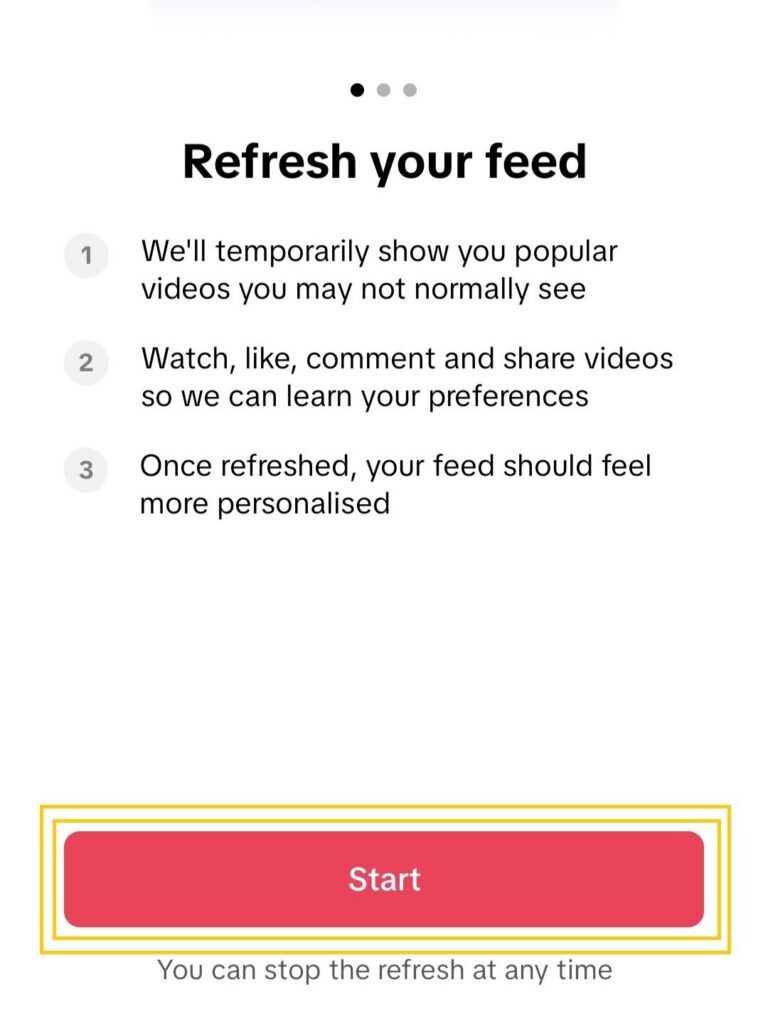
If you want to know how to reset FYP (TikTok Feed) in the fastest, most reliable way, use TikTok’s official Refresh your For You feed feature.
The feature restarts how your For You Page (FYP) is personalized going forward.
It doesn’t delete your account, followers, or posted videos—but once you refresh the feed, it can’t be undone.
Steps (TikTok app on iPhone/Android)
- Open TikTok and tap Profile.
- Tap the Menu (☰) button.
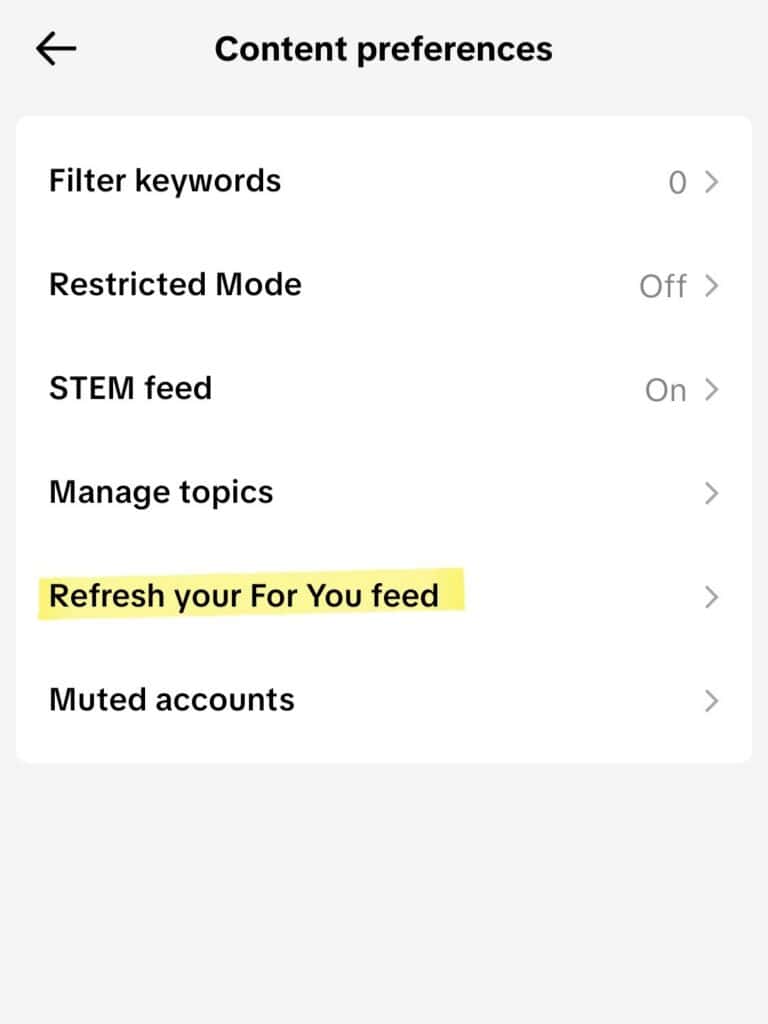
- Tap Settings and privacy → Content preferences.
- Tap Refresh your For You feed and confirm.
What this reset does (and does not) do
- It changes: the recommendations you see on your For You feed going forward.
- It does not delete: your followers, DMs, drafts, saved videos, or profile.
- Expect a short “re-learning” period: your first day of watches, skips, searches, and follows shapes strongly what you see next.
If you’re only seeing a handful of unwanted videos, you may not need a full reset, using Not interested consistently can be enough (steps below).

Quick Reset Methods to Reset Your TikTok Algorithm (FYP / Feed)
TikTok’s For You Page (FYP) is a powerful market research and content discovery tool for businesses.
With more than a billion people using TikTok each month, maintaining an optimized FYP can improve how quickly you spot industry trends and recognize shifting customer preferences.
Here’s how to effectively reset and refine your feed for maximum business value.
Official TikTok Algorithm Reset: “Refresh Your For You Feed” (Settings Steps)
TikTok’s official reset feature, Refresh your For You feed, offers the most complete way to reset recommendations.
Once you refresh the feed, it can’t be undone, so use it when you’re ready to retrain your FYP from new viewing signals.
- Go to Settings and Privacy
- Scroll to Content preferences
- Select “Refresh your For You feed“
This method creates a clean slate while preserving your account’s essential elements: followed accounts, saved content, and existing settings.
Consider timing this permanent reset to align with specific marketing campaigns or seasonal business shifts.
According to TikTok Business insights, businesses that regularly optimize their FYP see up to 30% higher engagement with industry-relevant content.
How to Reset TikTok FYP on PC (Desktop Web): What’s Possible + Best Workarounds
TikTok’s full Refresh your For You feed reset is primarily an in-app (mobile) feature.
If you’re using TikTok on PC (tiktok.com), you may not see the same reset button. So, the best approach is to reset your recommendation signals.
Option A (best): Do the official reset on mobile, then use TikTok on PC
Use the mobile reset steps above.
Because recommendations are tied to your account, your desktop feed can improve after you reset and then watch/search/follow consistently.
Option B: Improve your desktop feed without the reset button
- Skip fast on off-topic videos (don’t let them loop).
- Use Not interested whenever it’s available.
- Search your target topic, then watch several videos to completion.
- Follow a few creators in the niche you want to see more of.
- Unfollow accounts that no longer match your interests.
Clearing browser cookies/cache can help performance or logins, but it doesn’t “delete the algorithm.” Your strongest lever is consistent viewing and following behavior.
Alternative Reset Techniques
Resetting your TikTok algorithm can be achieved by fine-tuning your feed using TikTok’s sophisticated content filtering system:
- Long-press videos that don’t match your business interests
- Select “Not interested” to reduce similar content
- Actively engage with industry-relevant content (likes, comments, shares)
- Follow authoritative accounts in your business sector
These actions help TikTok’s algorithm understand your professional preferences.
With consistent interaction, many users notice their FYP starts to shift within a few days as TikTok re-learns what you want to see based on your watches, skips, searches, and follows.
Clear TikTok Cache vs Reset the Algorithm (What Each One Does)
Optimize TikTok’s performance through regular technical maintenance:
- Access Settings and privacy
- Locate Free up space
- Clear cache to improve app functionality
- Perform this maintenance weekly for best results
Combined with strategic content interaction, proper app maintenance ensures TikTok’s algorithm accurately serves your business intelligence needs.
Clearing cache primarily helps with storage and performance (like loading issues). It may not meaningfully change recommendations on its own.
Your feed is most influenced by what you watch, search, follow, and mark as “Not interested.”
The available reset methods transform your TikTok FYP into a valuable business intelligence tool.
By implementing these techniques systematically, you’ll create a customized feed that consistently delivers relevant, actionable content aligned with your industry focus and business objectives.
Maximizing Your Reset Results
The effectiveness of your TikTok FYP reset transforms your platform experience from casual browsing into a strategic business intelligence tool.
Research shows that businesses leveraging TikTok’s algorithm effectively see up to 3x higher engagement rates compared to traditional social platforms.
Optimal Timing For FYP Reset
Strategic timing of your FYP reset directly impacts your business intelligence gathering capabilities:
- Execute resets during market research phases
- Implement before launching new products or services
- Schedule resets when exploring new market segments
- Time resets to coincide with industry events or seasonal trends
The algorithm demonstrates heightened sensitivity to new signals within the first 48 hours post-reset, making your initial interactions essential for future content recommendations.
Pre-Reset Preparation Steps
A methodical preparation approach ensures maximum value from your reset:
- Create a detailed list of industry-specific hashtags
- Research 5-10 influential creators in your business sector
- Document current trending topics relevant to your market
- Review and update content preferences settings
- Filter out irrelevant topics and hashtags
TikTok’s internal data reveals that users who prepare targeted content strategies see 40% more relevant recommendations within their first week post-reset.
Post-Reset Best Practices
The initial 24-72 hours following your reset critically shape your future content ecosystem:
- Watch relevant videos completely (TikTok prioritizes content similar to videos with high completion rates)
- Interact meaningfully with business-aligned content through:
- Thoughtful comments
- Strategic saves
- Selective shares
- Follow industry leaders and topic-specific hashtags
- Avoid engaging with off-topic content, as even negative interactions influence the algorithm
Studies show that businesses maintaining consistent post-reset engagement strategies experience a 60% improvement in content relevancy.
Each interaction functions as a data point, training the algorithm to deliver increasingly targeted recommendations aligned with your business objectives.

Explore More Resources
Looking to take control of your feed—or your entire social media presence? Dive into our collection of practical tips, platform guides, and expert strategies across TikTok, Instagram, and more.
Building Your Ideal FYP After Reset
After implementing your FYP reset, transforming your TikTok feed into a powerful business asset requires strategic curation.
Recent data shows that businesses achieving optimal results on TikTok spend 15-20 minutes daily fine-tuning their For You Page, resulting in 60% more relevant content discovery.
Strategic Content Interaction
TikTok’s algorithm weighs user behavior as a primary ranking factor, making each interaction crucial for feed optimization. To maximize your content curation:
- Watch relevant business content completely – TikTok’s internal studies show that completion rates are 2.5x more influential than likes
- Save valuable industry insights and competitor analysis videos for reference
- Share content that aligns with your business goals to strengthen algorithmic preferences
- Use the “Not Interested” feature (long-press) to remove irrelevant content, helping TikTok understand your professional focus
Following Patterns That Matter
Your following strategy shapes your FYP’s business value. TikTok’s Business Solutions reports that targeted following patterns can increase relevant content discovery by 40%. Consider these proven approaches:
- Follow industry leaders and successful competitors in your niche
- Monitor accounts sharing valuable market insights and trend analysis
- Utilize the “filter video keywords” feature to exclude non-business content
- Regularly audit and refine your following list based on content relevance
Time Investment Guidelines
Building a business-focused FYP demands consistent, strategic engagement.
Data from TikTok’s Business Performance Studies reveals that accounts spending 15-20 minutes daily on focused interaction see 3x more relevant business content.
Maximize your time by:
- Researching industry-specific hashtags that drive business discovery
- Engaging with content that addresses your target market’s interests
- Participating in relevant business conversations through thoughtful comments
- Analyzing trending sounds and topics within your industry vertical
Remember: TikTok’s algorithm adapts continuously to your interaction patterns.
Regular, purposeful engagement creates a self-reinforcing cycle of increasingly relevant business content, transforming your FYP into a valuable market research and competitive analysis tool.
Common Reset Mistakes To Avoid
Understanding what not to do when resetting your TikTok FYP directly impacts your business’s content performance.
According to TikTok Business statistics, 92% of users take action after watching branded content, making proper feed optimization crucial for business growth.
Let’s examine the key pitfalls that can derail your content strategy and impact your reach.
Can You “Delete” or “Clear” the TikTok Algorithm? (What Those Searches Really Mean)
You can’t literally delete the TikTok algorithm. It’s TikTok’s recommendation system.
What you can do is reset or overwrite the signals it uses (what you watch, skip, search, follow, like, and mark as “Not interested”).
Refresh vs cache vs “clear the algorithm”
- Refresh/reset (best): The Refresh your For You feed option restarts how TikTok personalizes your FYP going forward.
- Clear cache: Clearing cache mainly removes temporary files to fix storage or performance issues. It may not meaningfully change recommendations by itself.
- “Clear algorithm” (what people mean): Stop reinforcing the wrong topics and actively reinforce the right ones.
48–72 hour “re-train” checklist
- Skip off-topic videos immediately (avoid re-watching or commenting).
- Use Not interested repeatedly on irrelevant topics.
- Unfollow accounts that train your feed in the wrong direction.
- Search your target niche and watch several videos fully.
- Like/save sparingly—only on content you want repeated.
Counterproductive Behaviors
Technical shortcuts like clearing the cache or uninstalling TikTok rarely influence your content recommendations.
TikTok’s sophisticated algorithm stores user preferences on its servers, making these surface-level fixes ineffective for businesses seeking meaningful reach.
Research from TikTok’s Creator Portal confirms that meaningful feed customization comes from strategic interaction with platform features, not technical workarounds.
- Focus on “Not Interested” features within TikTok
- Utilize content filtering tools in your settings
- Maintain consistent interaction patterns
- Build a clear content consumption strategy
Avoid Common Social Media Mistakes
Too many brands waste time on the wrong fixes. Learn what works—on TikTok and other platforms—by exploring expert tips, proven strategies, and practical how-tos in our resource library.
Algorithm Confusion Signals
Every interaction shapes your TikTok feed – even negative ones. Business accounts often make the mistake of engaging with irrelevant content while trying to avoid it.
The TikTok algorithm interprets all engagement as interest signals, regardless of sentiment.
Mass unfollowing campaigns can trigger security protocols, potentially restricting your account’s visibility and growth potential.
- Avoid commenting on irrelevant content
- Skip rather than engage with misaligned videos
- Allow 48-72 hours for algorithm adjustments
- Maintain steady, purposeful interaction patterns
Engagement Pitfalls
Your advertising interactions and content engagement patterns significantly influence future recommendations.
TikTok’s Business Intelligence reports show that strategic engagement can increase branded content visibility by up to 142%.
Simply blocking accounts or using unauthorized reset methods can compromise both your account security and content reach.
Instead, build a systematic approach to content interaction that aligns with your business objectives.
- Document preferred content categories
- Engage consistently with industry-relevant videos
- Use TikTok’s native preference settings
- Monitor performance metrics through TikTok Analytics
Maintaining A Fresh FYP Experience
TikTok’s For You Page (FYP) serves as your business’s gateway to targeted content discovery and market insights.
Recent data shows that 92% of users take action after watching TikTok content, making a well-curated FYP essential for understanding industry trends and consumer behavior.
Regular Maintenance Tips
Interact purposefully with content that aligns with your business goals:
- Leave thoughtful comments on industry-relevant videos
- Save videos that showcase innovative business strategies
- Share content that provides valuable market insights
- Use the “Not Interested” feature strategically to filter out irrelevant content, helping TikTok’s algorithm understand your professional preferences.
According to TikTok Business insights, accounts that actively curate their feed see up to 30% more relevant content recommendations.
Content Diversity Strategies
Explore varied content formats within your industry:
- Educational tutorials and how-to guides
- Behind-the-scenes business operations
- Market analysis and trend forecasts
- Customer success stories
Use TikTok’s advanced search features to discover industry-specific hashtags and trending sounds.
Studies show that businesses engaging with diverse content categories within their niche experience 25% higher discovery rates.
Also, monitor video completion rates. TikTok’s algorithm weighs watch time heavily when determining content relevance.
Spending more time on videos that matter to your business signals a stronger interest in the platform.
Long-Term Management Techniques
Create a sustainable content ecosystem by regularly auditing your TikTok connections.
Review the accounts you follow quarterly to ensure they continue providing value to your business objectives.
TikTok’s 2023 Business Trends Report indicates that accounts maintaining consistent, focused engagement patterns see 40% better content alignment.
Build a versatile network by following thought leaders and innovative creators in your industry.
Remember that TikTok’s algorithm evaluates your complete interaction history.
Maintaining a strategic balance between content exploration and focused engagement optimizes your feed for business growth.
Stay Ahead with Smarter Strategies
Keeping your feed relevant takes more than random scrolling. Explore our expert-backed resources to fine-tune your algorithm experience on TikTok and other major platforms.
Frequently Asked Questions
Conclusion
TikTok’s For You Page represents a powerful business intelligence tool when strategically optimized.
According to TikTok’s 2023 Business Marketing Report, 67% of users say the FYP helps them discover new brands and products in their industry.
By leveraging built-in features like “Refresh your For You feed” and implementing intentional content interaction strategies, businesses can transform their feed into a competitive advantage.
Consider your FYP as an evolving market research dashboard:
- Strategic following of industry leaders and competitors
- Thoughtful engagement with relevant content
- Regular content preference updates
- Focused interaction with business-specific hashtags
The platform’s sophisticated algorithm responds to these deliberate actions, creating a self-reinforcing cycle of relevant content discovery.
Each interaction, whether through likes, shares, or comments, refines your feed’s business value.
Research shows that businesses spending 15-20 minutes daily on FYP optimization report 3x better industry trend awareness and partnership opportunities.
Transform your TikTok experience into a strategic asset by implementing these data-driven approaches.
A well-curated FYP serves as your window into emerging market trends, potential business collaborations, and untapped growth opportunities.
With 89% of successful TikTok business accounts attributing their growth to an optimized For You Page, the impact of strategic feed management on business development is clear and measurable.