Quick Answer: How to Remove a Follower on TikTok
The fastest way to remove a follower on TikTok is the Profile Method: go to your profile → tap Followers → tap the three dots next to the user → select “Remove this follower.” Each removal takes about 3–5 seconds, and TikTok does not notify the person (source).

The Profile Method (Fastest Way)
This is the most efficient way to remove one or more followers without leaving your followers list.
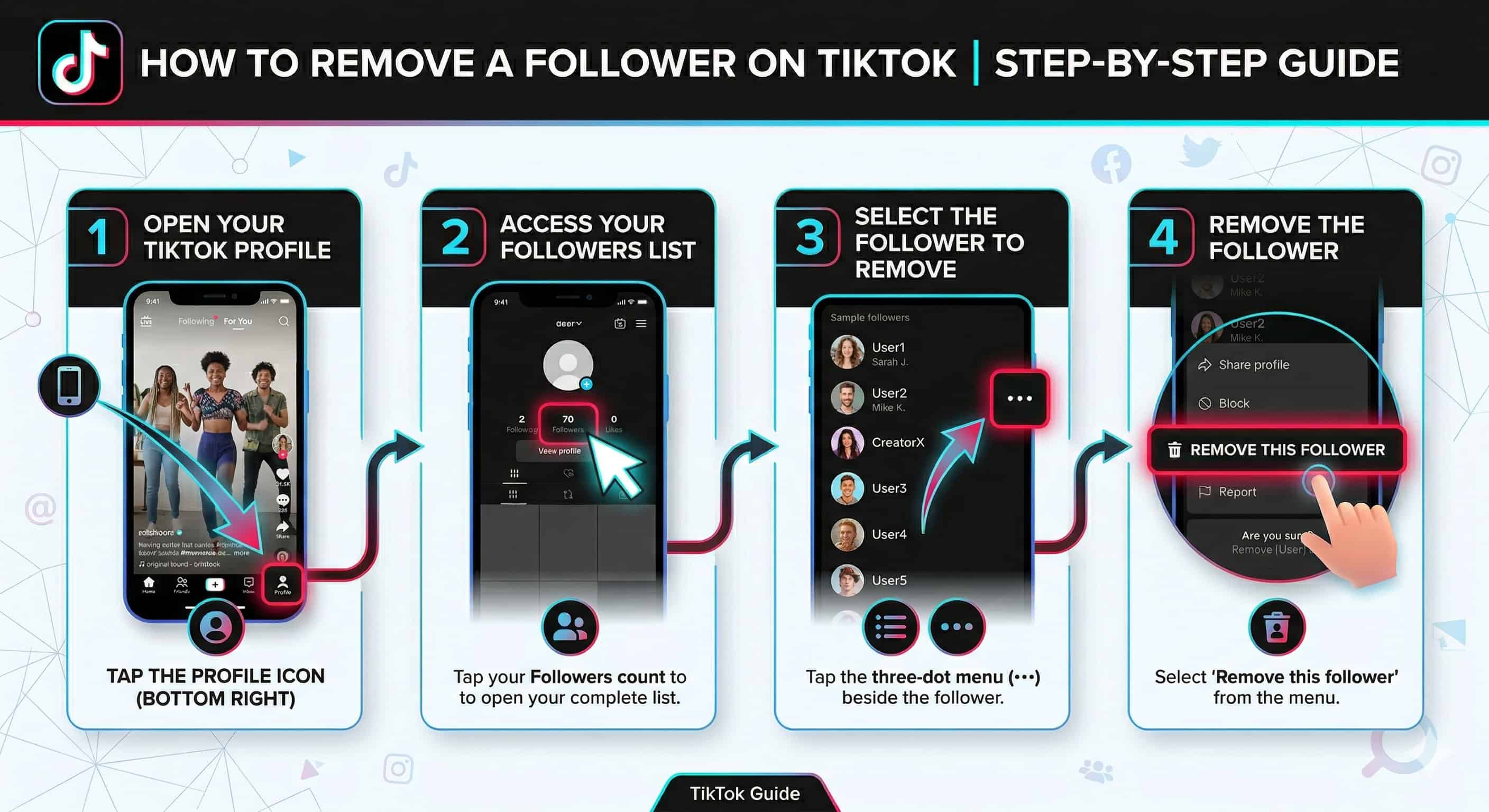
Open your TikTok profile
Open TikTok and tap the profile icon in the bottom-right corner.
Access your followers list
Tap your Followers count to open your complete followers list.
Select the follower to remove
Tap the three-dot menu beside the follower you want to remove.
Remove the follower
Select “Remove this follower” from the menu.
You can repeat steps 3-4 for each follower. Because you stay inside the followers list, this method takes roughly 3-5 seconds per person-about 12-20 followers per minute.
How to Remove a Follower from Their Profile Page
Use this approach when you come across a follower while browsing content or comments.

Go to the follower’s profile page
Go to the follower’s profile page.
Tap the share button
Tap the share button at the top of their profile.
Remove the follower
Select “Remove this follower” from the menu.
This method takes about 8-12 seconds per follower (including navigation), so it works best for single, immediate removals.
Can You Remove All Followers on TikTok at Once?
No. TikTok does not offer a native feature to remove all followers at once or perform bulk removals. Each follower must be removed individually using the manual steps above.
If you need to remove a large number of followers, the safest approach is to schedule focused removal sessions:
- Use the Profile Method for speed.
- Remove followers in batches of 100-150.
- Spread larger tasks across multiple days to avoid triggering temporary rate limiting.
Avoid third-party tools. Apps, browser extensions, or bots that claim to mass-remove followers violate TikTok’s Terms of Service and can result in permanent account suspension or loss of all content (source).
Fastest Ways to Remove TikTok Followers
If speed matters, stick to the Profile Method and batch your work:
- Profile Method: ~3-5 seconds per follower (12-20 per minute). Best for removing 5 or more followers in one session.
- Direct Profile Page Method: ~8-12 seconds per follower (5-7 per minute). Best for one-off removals while browsing.
- Session pacing: Schedule 15-20 minute blocks. At the Profile Method speed, you can process roughly 180-240 followers per session.
- Safety limit: Keep each session to 100-150 removals and add breaks every ~50 removals to protect account stability.
What Happens When You Remove a Follower?
Deleting and removing followers are the same thing on TikTok. The app officially uses “Remove this follower,” but both terms mean the same action.
Here is exactly what happens:
- No notification is sent. The removed follower is not alerted.
- They can still see public content. If your account is public, they can view your videos and follow you again. If your account is private, they lose access until you approve a new follow request (source).
- Your follower count drops immediately. The change is instant.
- They can re-follow unless blocked. If you want to prevent them from following again, use the block feature.
Want to grow the right followers? Read our guide on how to grow your business with TikTok.
Quick Answers to Common Questions
Smart Follower Management Strategies
Cleaning your follower list helps keep your account focused on people who actually engage with your content.
Pre-Removal Assessment
Before removing followers, look for these quality signals:
- Account activity and posting frequency
- Profile authenticity (real photo, bio, content)
- Relevance to your content or business niche
- Comment quality and sentiment
- Content sharing patterns
Best Times to Audit Your Follower List
- After major marketing campaigns
- When engagement rates drop
- Following sudden follower growth
- During monthly or quarterly reviews
Use TikTok’s Native Analytics
TikTok’s built-in analytics help you identify high-value followers:
- Follower Activity Insights – see when your audience is most active
- Audience Analytics – check demographic alignment
- Content Performance Metrics – identify which followers engage most
- Interaction History – evaluate comment and share frequency
Privacy & Security Settings
Beyond removing individual followers, TikTok offers several controls to protect your account and shape who can interact with you.
Essential Privacy Settings
- Comment Management – filter keywords and moderate discussions automatically
- Interaction Limits – control who can message you, duet with you, or use Stitch
- Account Discovery – manage how your profile appears in search and recommendations
- Content Permissions – restrict downloads and sharing of your videos
Follower Approval Systems
Switching to a private account means you manually approve every new follow request. This is useful if you want to:
- Reduce spam and bot followers
- Prevent competitors from accessing your content
- Create exclusivity around your posts
- Control exactly who sees your videos
Content Visibility Options
- Public Access – reach new viewers through TikTok’s algorithm
- Follower-Only – share exclusive content with approved audiences
- Custom Lists – create specific viewer groups for specialized content
- Geographic Targeting – control visibility by region
Account Security Best Practices
- Enable two-factor authentication
- Connect a business email for security alerts
- Use a strong, unique password
- Review activity logs regularly
Professional Tips for Managing Your TikTok Audience
Identifying Suspicious Followers
Watch for these warning signs:
- No profile picture or generic username
- Zero posted content or suspicious posting patterns
- Sudden spikes in following behavior
- Following thousands of accounts but having very few followers
If you spot problematic behavior, you can report a user on TikTok directly through the app.
Maintaining Engagement Quality
Focus on metrics that reflect genuine audience interest:
- Video completion rates
- Comment quality and frequency
- Share and save ratios
- Profile visit conversion rates
Accounts that regularly audit their follower base and remove inactive or spam accounts typically see better engagement over time.
Regular Maintenance Schedule
- Weekly: Quick engagement pattern review
- Monthly: Detailed follower quality check
- Quarterly: Full audience alignment audit
Frequently Asked Questions
Conclusion
Removing followers on TikTok is a simple, manual process that takes about 3-5 seconds per person using the Profile Method. There is no bulk removal feature, and TikTok never notifies the removed follower. By auditing your follower list regularly and using TikTok’s privacy controls, you can maintain a more engaged, relevant audience.
If you need help building a stronger TikTok presence, explore our Social Media Strategy services or learn more about Social Media Management.