How to Report Someone on TikTok: Quick Overview
TikTok reports are completely anonymous and typically reviewed within 24-48 hours. You can report accounts, videos, comments, live streams, or direct messages that violate TikTok’s Community Guidelines. Reporting does not automatically delete an account—TikTok takes action based on violation severity, ranging from warnings to permanent bans.
Key Facts: TikTok has 1.59 billion monthly active users. Over 167 million videos were removed for violations in Q1 2024—reporting works when done correctly.
What you can report:
- TikTok accounts engaged in harassment, spam, or impersonation
- Individual videos containing harmful or inappropriate content
- Comments and direct messages with abusive or threatening language
- Live streams broadcasting violations in real-time
All reports are confidential. The reported user receives only a generic Community Guidelines violation notice—never your identity.
Frequently Asked Questions (Quick Answers)
How to Report a TikTok Account (Step-by-Step)
Use this method when an entire account engages in problematic behavior—harassment campaigns, impersonation, spam distribution, or repeated guideline violations.

Mobile App Instructions:
- Navigate to the profile — Tap the username or profile picture of the account you want to report
- Open the share menu — Tap the share button (arrow icon) in the top-right corner
- Select “Report” — Choose “Report” from the menu options
- Choose “Report account” — This flags the entire account, not just one video
- Select violation type — Pick the category that best matches the issue:
- Impersonation
- Spam or misleading content
- Harassment or bullying
- Hate speech
- Dangerous behavior
- Provide specific details — Include timestamps, specific videos, or pattern descriptions
- Submit your report — Tap submit for confidential review
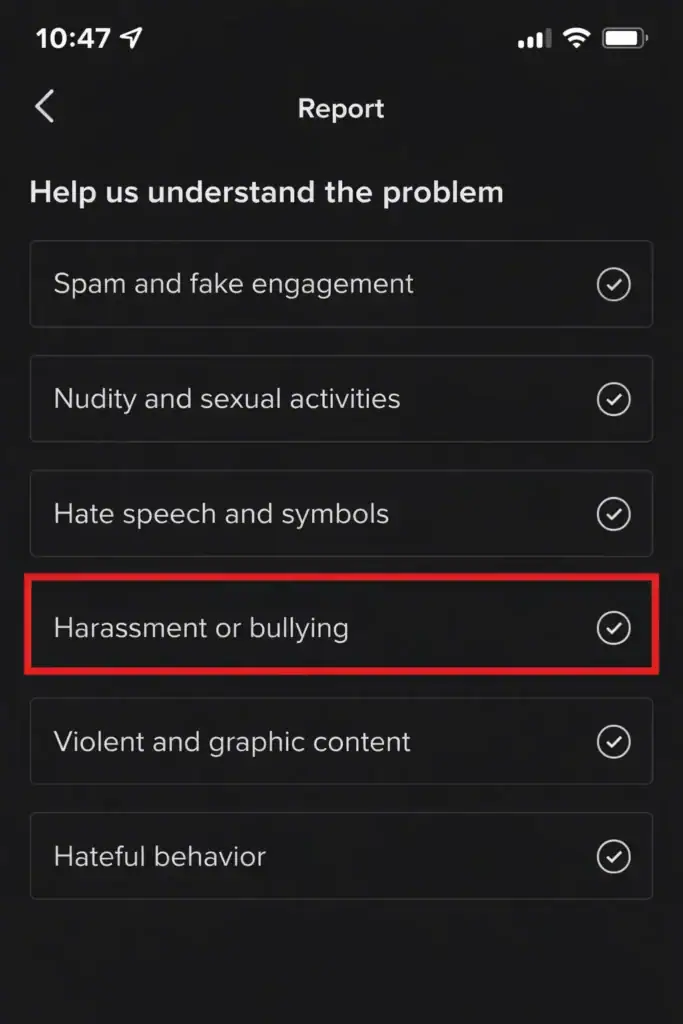
Web Browser Instructions:
- Visit tiktok.com and navigate to the profile
- Click the three-dot menu icon on their profile page
- Select “Report” from the dropdown
- Follow the same category selection and detail process as mobile
Note: Account reports are appropriate for ongoing behavior patterns. For single-video violations, report the specific video instead (see next section).
How to Report a TikTok Video
Report individual videos containing harmful content, intellectual property violations, or guideline breaches while keeping the account active.
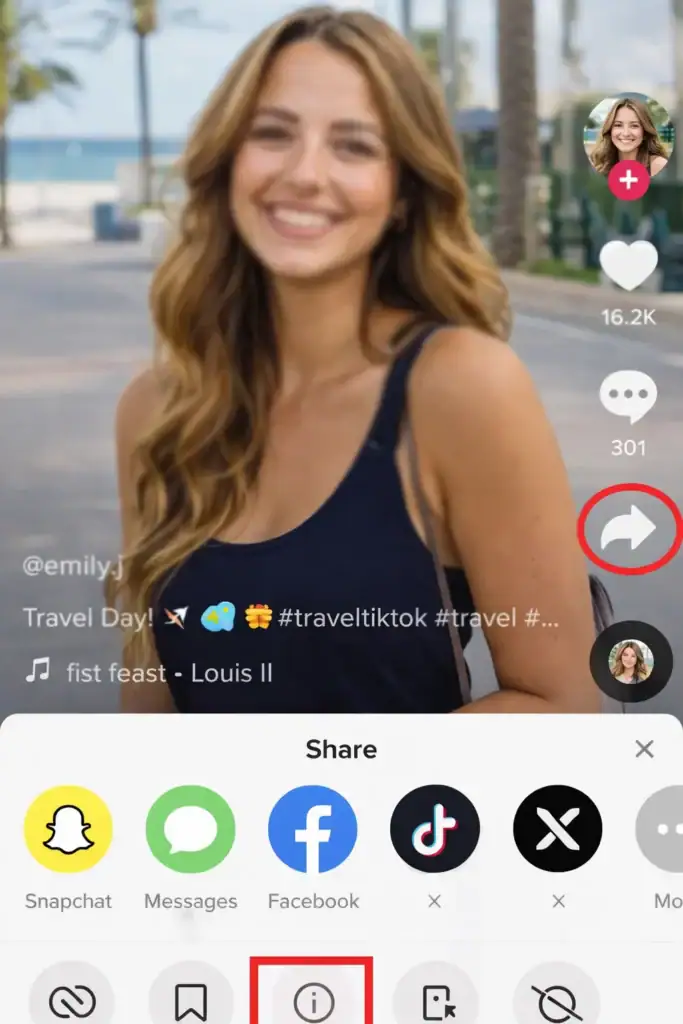
Step-by-Step:
- Watch the video — Confirm the violation (you can report without finishing)
- Tap the share arrow — Located on the right side of the video
- Select “Report” — Found in the bottom menu that appears
- Choose violation category — Options include:
- Hate speech or hateful behavior
- Harassment or bullying
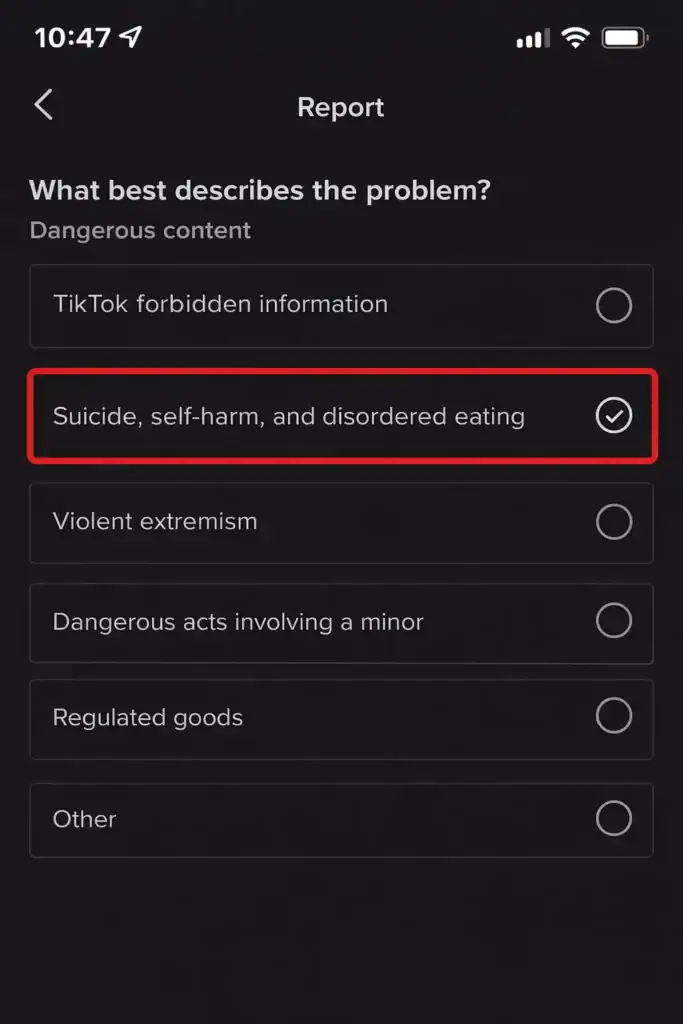
- Dangerous content (self-harm, violence)
- Sexual content or nudity
- Violence or graphic content
- Spam or misleading
- Intellectual property violation
- Select sub-category — Choose the most specific option for faster routing
- Add context — Describe the violation clearly; include timestamps for long videos
- Submit — Your anonymous report enters the review queue
Account vs. Video Report:
- Report video — Content violation on single post; account stays active
- Report account — Pattern of violations or serious impersonation; risks account suspension
How to Report Comments, Messages, and Live Streams
Reporting Comments
For abusive, spam, or threatening comments on videos:
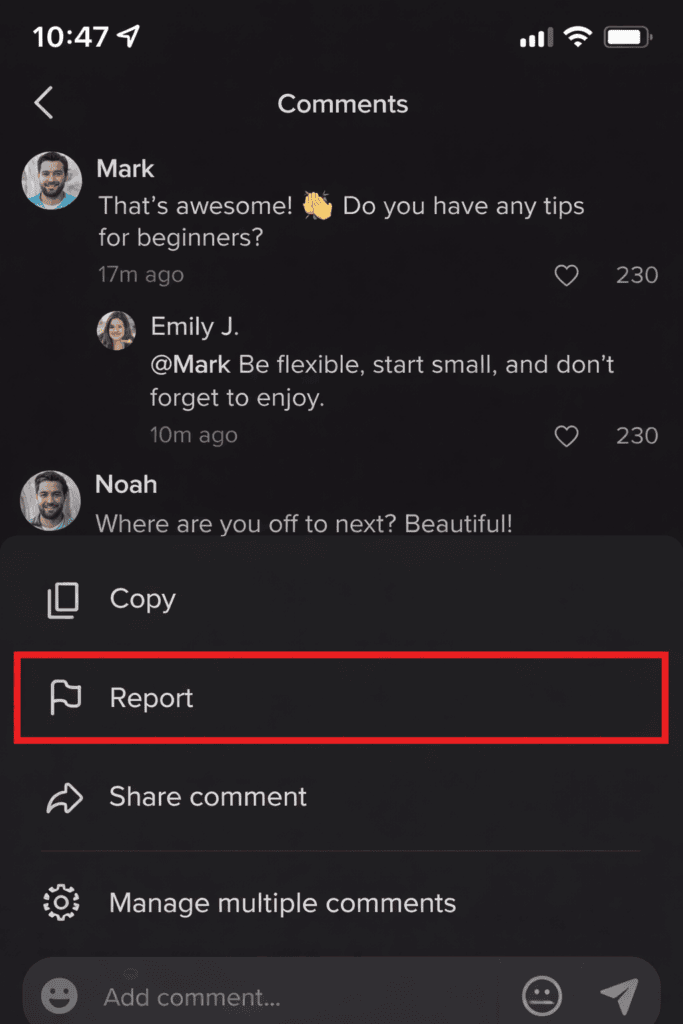
- Long-press the comment — Or tap the arrow next to it
- Select “Report” — From the menu that appears
- Choose violation type — Harassment, spam, hate speech, or other
- Submit — Comment reports are processed within 24 hours typically
Reporting Direct Messages
For threatening or inappropriate private messages:
- Open the conversation — Navigate to the message thread
- Tap the three-dot icon — In the top-right corner
- Select “Report” — Choose the violation category
- Provide context — Explain why the message violates guidelines
- Submit — DM reports receive priority for safety concerns
Reporting Live Streams
For real-time violations during TikTok Live broadcasts:
- Tap the flag icon — Located in the bottom-left corner during the live
- Select violation reason — Choose the appropriate category
- Add context — Describe what’s happening in the live stream
- Submit — Live reports receive priority review due to real-time nature

Priority Handling: Live stream reports receive expedited review since the violation is happening in real-time. TikTok can terminate broadcasts immediately for severe violations.
Does Reporting a TikTok Account Get It Deleted?
Short answer: Not automatically. Reporting triggers a review process—deletion depends on violation severity and account history.
TikTok’s Enforcement Tiers
| Violation Level | Typical Response | Account Status |
|---|---|---|
| ● First-time minor | Warning notice | Active |
| ● Repeated minor | Temporary restriction | Limited functionality |
| ● Moderate violations | 24-hour to 7-day suspension | Temporarily disabled |
| ● Serious violations | Permanent ban | Deleted |
What Qualifies for Permanent Deletion
- Child safety concerns — Content exploiting or endangering minors
- Violent threats — Credible threats of violence or harm
- Illegal activity — Promotion of illegal goods, services, or actions
- Coordinated harassment — Systematic targeted abuse campaigns
- Severe impersonation — Fraudulent business or identity theft
Did you know? According to TikTok’s Q1 2024 enforcement data, the platform removed 195 million accounts globally, with 21.6 million specifically for underage violations.
Factors That Increase Deletion Likelihood
- Clear documentation — Screenshots, timestamps, specific descriptions
- Pattern evidence — Multiple violations from the same account
- Serious category selection — Correctly categorizing as harassment vs. general “inappropriate”
- Business/IP context — Trademark violations with documentation
Tips for Getting Your Report Approved
Reports with thorough documentation receive responses 35% faster than basic submissions. Follow these evidence-gathering practices:
Document Everything
- Screenshots — Capture the profile, video, or comment with timestamps visible
- URLs — Save direct links to violating content
- Timestamps — Note when violations occurred (especially for live streams)
- Pattern log — For ongoing harassment, document multiple instances
Select the Correct Category
Precision matters. “Intellectual Property Violation” routes to specialized teams familiar with business infractions. General “Inappropriate Content” may take longer and reach general moderators.
Provide Business Context
For brand protection issues, include:
- Trademark registration numbers
- Original content creation dates
- Previous communication attempts with the violator
- Business impact assessment
Managing TikTok Safety for Business Accounts

Business-Specific Protection Measures
Content Filtering: Enable “Restricted Mode” to automatically screen content using AI-powered algorithms. This keeps your business feed professional and industry-appropriate.
Privacy Controls: Adjust comment filtering, viewer interaction permissions, and content sharing limitations through the “Privacy and Settings” dashboard.
Verification: Verify your identity on TikTok to establish brand authenticity and reduce impersonation risk.
Blocking: For immediate protection, block problematic users to prevent them from viewing your content or interacting with your posts. Note that blocking works separately from reporting—use both for maximum security.
When to Escalate Beyond Reporting
For situations involving serious threats, fraud, or legal concerns:
- Contact local law enforcement for threats of violence or illegal activity
- TikTok’s Business Support Hub provides 24/7 assistance for account security issues
- Document everything for potential legal proceedings
Frequently Asked Questions
Protect Your Brand on TikTok
A safer TikTok environment directly correlates with improved customer trust, higher engagement rates, and stronger business outcomes. By participating in responsible reporting practices, you’re not just protecting your interests—you’re investing in a platform that continues to deliver measurable marketing results.
Need expert guidance? Our team provides hands-on support for maintaining platform integrity while maximizing engagement. From content strategy to crisis management, we help brands navigate TikTok’s evolving landscape.