You told your media buyers to keep the brand off Marketplace, Messenger, and Audience Network, and for years that setting held.
Now the ad-set switch you relied on is disappearing for some advertisers, and the worry is obvious: will your ads start showing up on surfaces you never approved, cropped and clipped in ways that make an established brand look cheap?
Here is the calmer read.
Control did not vanish; it moved. The removal of ad-set exclusions is the hook, but the real substance is building a creative system that holds up wherever Meta serves your ads.
When you can no longer hide weak creative by switching off a placement, the creative itself has to carry the load across Facebook Feed, Stories, Reels, Marketplace, Messenger, in-stream, and Audience Network.
What Meta ad placements are (quick answers)
Meta ad placements are the locations where Meta can deliver your ads across Facebook, Instagram, Messenger, and partner apps.
Advantage+ placements is Meta’s automated delivery option that finds cost-effective opportunities across Meta technologies and eligible surfaces, rather than limiting delivery to a single placement.
What are Meta ad placements?
They are the locations where Meta delivers ads: Facebook Feed, Stories, Reels, Marketplace, Messenger, in-stream video, search results, right column, and partner-app inventory served through Audience Network. Availability varies by objective, platform, and current Ads Manager setup.
What changed with placement controls in 2026?
Reports published from August 20, 2026 described an Ads Manager notice telling some advertisers that ad-set-level exclusions for placements and platforms would no longer be available, with some reports also noting devices and operating systems.
Treat the exact scope of the notice as based on third-party reporting rather than a confirmed official statement.
As of early September 2026, the change looked like a rolling test tied to Sales and Leads objectives, and Meta had not confirmed a global rollout date based on available reporting at the time.
What placement control remains?
Account-level placement controls can serve as brand policy where available. Value rules adjust bid preference by placement, with a reported range of +1,000% to -90%, but a negative adjustment lowers your bid preference rather than cutting spend to zero.
Placement customization lets you assign placement-specific creative versions.
How the change surfaced
Jon Loomer was among the first to surface the change, spotting an in-product notice in Ads Manager rather than a press release. Social Media Today reported the same notice on August 20, 2026, and PPC Land covered the wider brand-control debate around it.
None of these was an official Meta announcement.
The direction itself is not new. Meta made Advantage+ placements the default, added warnings when advertisers removed placements, and began allowing a small share of budget to reach excluded placements. Its stated reasoning is performance: Meta’s own documentation says ad sets using Advantage+ placements delivered an 11.7% lower cost per action on average than ad sets using manual placement settings. Removing ad-set exclusions is the next step in handing placement decisions to the system.
The notice, as reported by these sources, indicated that excluding placements and platforms would no longer be available at the ad-set level.
Some reports also mentioned devices and operating systems, though the full wording of the notice was not independently verified. Loomer’s reporting described it as a test tied to Sales and Leads objectives, with sensitive verticals excluded, not a confirmed global switch.
For definitions of each surface and of Advantage+ placements, the Meta Business Help Center is still the primary reference.
Read it with one caveat: the help pages may lag the product and still describe ad-set exclusions that your account no longer offers. What survives the change, per current reporting, is account-level placement controls as policy and value rules as bid tuning.
Rollout status as of September 2026
As of early September 2026, Jon Loomer and Social Media Today describe a rolling Ads Manager test tied to Sales and Leads objectives. Loomer’s reporting adds that sensitive verticals are excluded. Based on available reporting at that time, Meta had not confirmed a global rollout date.
Verify current options in your own account.
Placement by placement: what each surface actually is
Facebook Feed is the scrolling main feed on Facebook, where taller vertical crops can capture more screen space than a square format. Stories ads are full-screen, vertical placements that appear between people’s Stories on Facebook and Instagram, viewed in a fast tap-through format.
Reels are full-screen vertical video slotted into the short-form feed, with interface overlays along the bottom and right side of the screen.
Marketplace places your ad inside Facebook’s buy-and-sell listings alongside other products and listings, so context and framing matter. Messenger delivers ads in the Messenger surface and, in some formats, in placements connected to conversations.
Audience Network extends delivery to third-party apps and sites outside Meta’s own properties, which is exactly the surface brand leaders most often want to police.
Beyond these, Meta ad placements also include in-stream video breaks, search results, and the desktop right column.
The point of listing all of them: once ad-set exclusions go away, your creative can land on any eligible surface, and most placement guides quietly skip Marketplace, right column, and in-stream.
Assume every one of them is in play.
What placement control still exists
Three levers remain, and they do different jobs. Confusing them is how brands end up either over-restricting delivery or assuming they have a hard block they do not have.
Account-level placement controls act as standing brand policy on which surfaces are eligible. Some accounts can set restrictions that carry across campaigns, but availability varies.
Confirm the current eligible options in the Meta Business Help Center and in your live account before you promise anyone a permanent brand rule.
Placement customization is a creative tool, not a spend tool. It lets you assign different creative versions to selected placements at the ad level, which is how you keep Advantage+ placements from stretching one asset across surfaces it was never designed for.
The trade-off is production: you have to make the variants.
| Control | What it does | Scope | Key limitation |
|---|---|---|---|
| Account-level placement controls | Restrict which surfaces are eligible for your ads where the account offers it | Account-wide where available | Availability varies by account and campaign setup; verify current eligible options in Meta Business Help Center before treating as a guaranteed block |
| Value rules | Adjusts bid preference by placement or audience signal to steer spend | Campaign-level where eligible | Reported adjustment range is +1,000% to -90%; a maximum negative adjustment lowers bid preference rather than reducing spend to zero, so it cannot serve as a hard exclusion |
| Placement customization | Assigns different creative versions to selected placements at the ad level | Ad-level | Requires producing multiple creative variants; a creative tool, not a spend or exclusion tool |
Value rules: bid tuning, not full exclusion
Value rules adjust how aggressively you bid for a placement or audience signal. Jon Loomer’s and PPC Land’s reporting describes them as value-based bid adjustments, with a reported range of roughly +1,000% to -90%.
That floor matters: even a maximum negative adjustment lowers your bid preference rather than setting spend to zero, so it does not function as a hard exclusion.
So if a compliance rule requires that your ad never appears on a given surface, a value rule will not deliver that. Use account-level controls, where your account offers them, for hard restrictions and value rules to steer spend toward the placements that convert.
The creative system that holds up across every placement
The fix for lost ad-set exclusions is not a new setting. It is a creative system built so that any eligible placement receives an asset designed for it, not a Feed square stretched sideways. Once you produce every ratio and assign it deliberately, broad delivery stops being a threat and becomes free reach.
The four aspect ratios and where each one goes
Four ratios cover almost every Meta ad placement. Produce all of them for core assets, then assign each to the surfaces it fits.
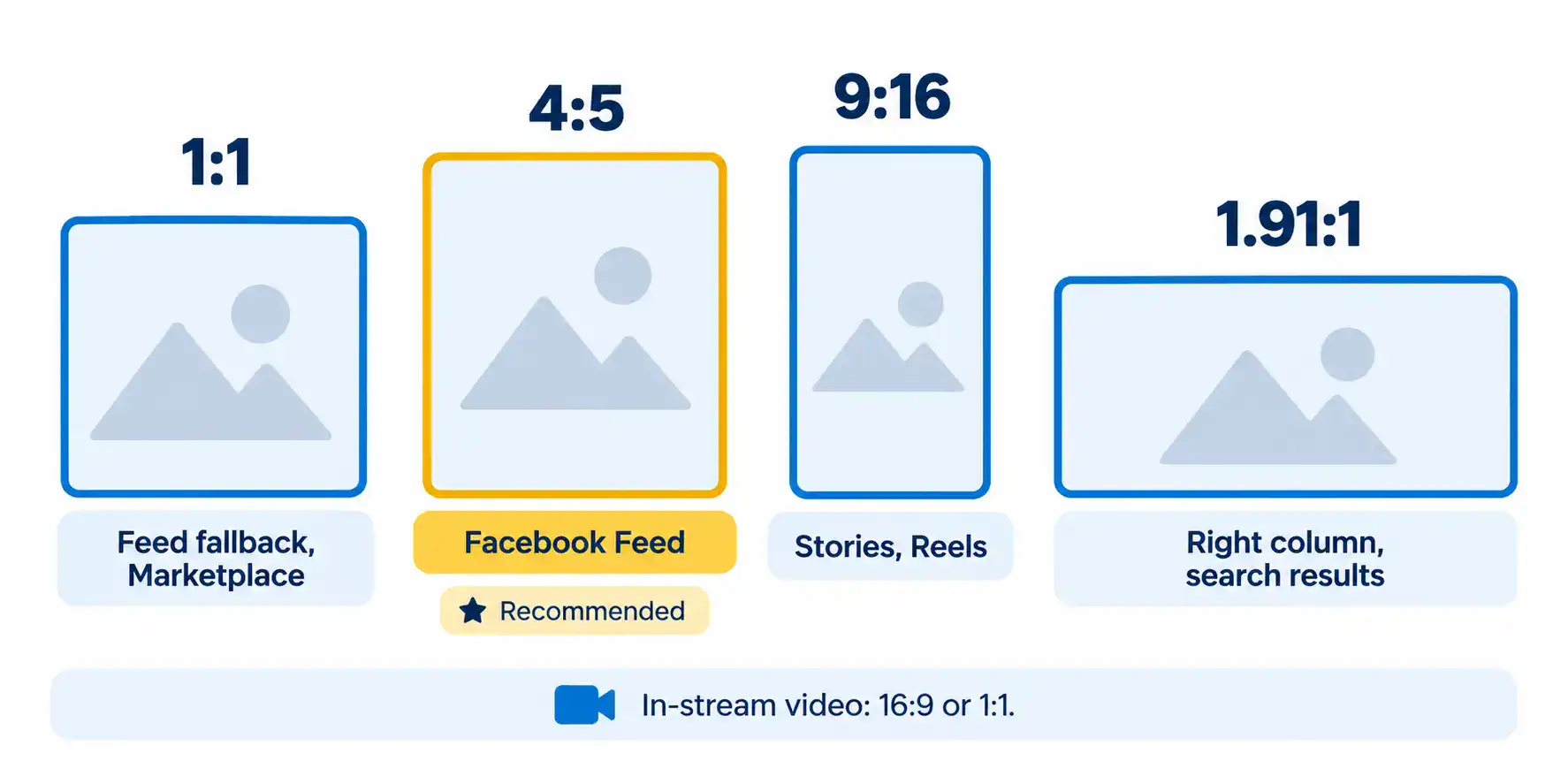
The 1:1 aspect ratio is the square format that Meta supports across multiple surfaces. The 9:16 aspect ratio is full-screen vertical for Stories and Reels.
The 4:5 aspect ratio is the taller crop Meta recommends for Facebook Feed images, capturing more feed height than a square. The 1.91:1 aspect ratio is a wide horizontal format used for right column and search results; verify exact requirements in the Meta Ads Guide before production.
| Ratio | Primary placements | Notes |
|---|---|---|
| 1:1 (square) | Feed (multi-surface fallback), Marketplace, some Messenger formats | Meta supports 1:1 across multiple surfaces, but 4:5 is recommended for Facebook Feed images; use 1:1 as a safe fallback rather than a first choice for Feed |
| 9:16 (vertical) | Stories, Reels | Full-screen vertical; keep composition, text, and product clear of edge overlays at bottom and right |
| 4:5 (tall) | Facebook Feed images | Taller crop captures more Feed real estate; Meta recommends 4:5 over 1:1 for Facebook Feed images |
| 1.91:1 (wide horizontal) | Right column and search results | Meta’s upload flow assigns 1.91:1 for right column and search results; verify exact pixel dimensions and eligible placements in Meta Ads Guide before production |
| 16:9 or 1:1 (in-stream exception) | In-stream video | Facebook in-stream video ads accept 16:9 or 1:1 at a minimum resolution of 1080×1080; treat this as an exception rather than a fifth core ratio |
Exact pixel dimensions and limits shift by objective and creative type, so confirm them in the Meta Ads Guide before production rather than trusting a single fixed spec.
Safe zones: keep essentials clear of UI overlays
Every full-screen surface stacks interface chrome on top of your creative. Stories and Reels place UI elements including captions, profile handles, and call-to-action buttons along the lower portion of the screen and at the edges. Marketplace frames your ad with listing details, and Messenger adds inbox elements around it.
Keep key text, logos, faces, and product detail away from the edges and out of the zones where that chrome sits. Design for the smallest screen and for sound off, with in-stream as the exception since the viewer is already watching with sound.
If the message only lands with audio or at desktop size, it fails on the surfaces where most impressions happen. A clear thumbnail beats a busy full-resolution frame that turns to mush at mobile scale.
Placement customization and pre-launch previews
Producing the assets is half the job. Assigning them and checking the render is the other half, and it is the step most teams skip.
Preview every eligible placement, not just Feed. The same asset can look clean in Facebook Feed and get its logo clipped in Stories, its product cropped in Reels, or its text crowded in Messenger, Marketplace, and Audience Network.
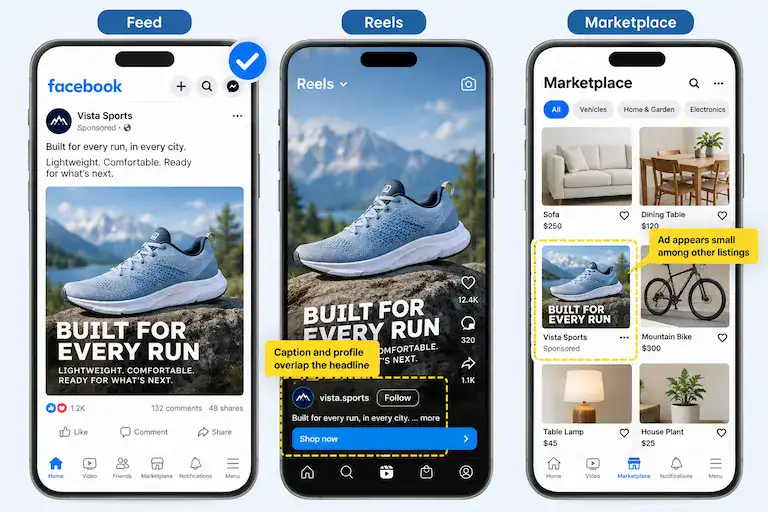
Take a single square product shot with the headline set across the bottom third. In Facebook Feed, it reads cleanly. Served in Reels without a vertical version, the caption, profile handle and call-to-action button can land directly on top of that headline. In Marketplace, the same image shrinks to a small tile among other listings, where the headline becomes hard to read and the product competes with secondhand items. Same asset, three very different impressions of the brand.
Placement customization only protects you if someone confirms the final render on each surface before launch.
The REI incident and why final-render review is not optional
In June 2026, an REI ad ran with an altered product image. As PPC Land reported, REI said Meta auto-enrolled it in an AI personalization tool that changed a vendor-provided bike photo, and the inaccurate version ran for about a week before anyone caught it.
Meta’s account differed. The company said Advantage+ Creative is off by default and requires deliberate action from the advertiser, which puts the two statements in direct tension.
The reporting carries competing accounts, so treat the cause as unsettled rather than proven.
The governance lesson holds either way. This is less an AI story than an account-settings problem: an automated enhancement changed a placement-ready asset, and no one reviewed the final render before it shipped.
Whoever owns the account has to know which enhancements are enabled and inspect what actually goes live.
Governance: account policy, bid tuning, and creative QA
Split placement governance into three layers so no single team carries all of it. Each layer maps to a different owner and a different cadence.
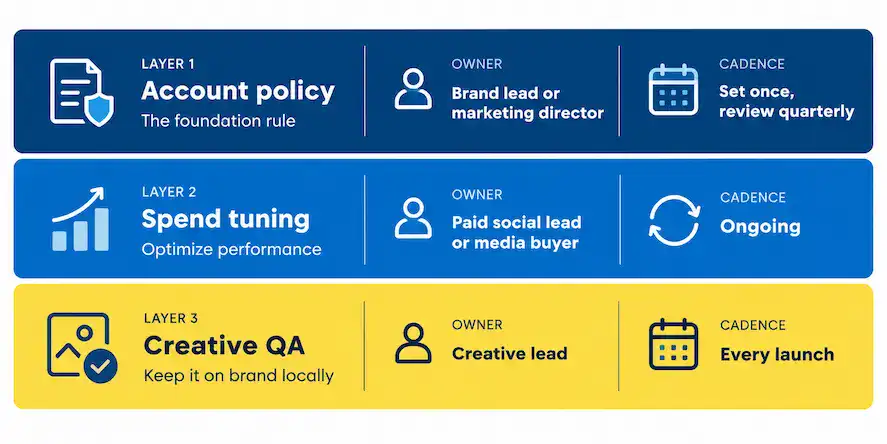
Account policy (owner: brand lead or marketing director; set once, review quarterly). Use account-level placement controls for any surface the brand should never appear on, document the decision, and check it quarterly against the current eligible options in the Meta Business Help Center.
Spend tuning (owner: paid social lead or media buyer; ongoing). Apply value rules only as bid-preference adjustments, and record which placements receive them so no one mistakes them for exclusions.
Creative QA (owner: creative lead; every launch). Confirm every ratio exists, check Advantage+ Creative enhancement settings, and inspect any AI-altered variations for accuracy and brand compliance before the campaign goes live.
Own these three layers and broad delivery stops being a risk.
For most brands, the heaviest lift is the third layer. Producing every core asset in four ratios and checking the final render on each surface is a production commitment, not a settings change. That is where social content production built for every placement pays off, and why teams running paid social advertising campaigns now need creative and media planned together rather than handed from one team to the next.
Are you placement-ready? Check your setup now
Six quick yes/no questions will show how exposed your current setup is, from the formats you produce to the settings you check before launch. Your result points to the one area to fix first.
How placement-ready is your Meta creative setup?
Answer all six questions, then see your result.
Question and outcome reference
- Do you produce 9:16 vertical versions of every core asset?
- Yes
- No
- Do you swap in 4:5 creative for Facebook Feed instead of relying on the default 1:1?
- Yes
- No
- Do you check that text, logos and product sit clear of placement UI overlays?
- Yes
- No
- Do you preview every placement before launch, not just Feed?
- Yes
- No
- Have you set account-level placement controls for surfaces your brand never wants to appear on?
- Yes
- No
- Exposed
Your creative likely only works well in Feed. Start by producing 9:16 vertical versions and 4:5 Facebook Feed assets before your next campaign launches.
0 to 2 yes answers. The gaps here are foundational: without vertical and near-square formats, safe-zone discipline, and placement previews, broad delivery will serve under-spec'd assets on Stories, Reels, and Audience Network.
- Partly covered
You have the basics, but gaps remain. Close them by previewing every placement before launch and reviewing your Advantage+ Creative enhancement settings.
3 to 4 yes answers. Your core formats exist, but your QA process or account-policy layer has holes that broad delivery will find before you do.
- Placement-ready
Your creative and account settings can hold up across Meta surfaces. Focus next on value rules to tune spend distribution across placements.
5 to 6 yes answers. The creative system and controls are in place. Shift attention to bid-preference value rules to steer spend toward your highest-performing surfaces.
Whatever your result, the Placement-Proof Creative QA Checklist turns the fixes into a one-page tick-box review your creative team, agency, and media buyers can run before every Sales or Leads campaign.
Downloadable resource
Placement-Proof Creative QA Checklist
PDF – 15.5 KB – Checklist
The bottom line
Losing ad-set placement exclusions does not strip your control; it relocates it. Account-level placement controls hold the hard brand rules, value rules steer spend within a +1,000% to -90% range, and placement customization assigns the right asset to each surface.
The real work is the creative system. Produce 1:1, 9:16, and 4:5 versions plus 1.91:1 for right column and search results, keep essentials clear of UI overlays, review your Advantage+ Creative settings, and preview the final render on every placement before launch.
Run the assessment, pull the checklist, and make that review a fixed step before your next Sales or Leads campaign goes live.