Your Reels quota went up again this quarter. Your editor’s hours did not.
That gap is exactly where Instagram First Draft fits, and exactly where it gets misused.
First Draft trims your selected clips and strips out dead pauses, then hands back a rough cut you can still change.
It does not pick your best moments, reorder your clips, or make brand calls.
Treat it as a cleanup layer for footage that was already close, not a replacement for the people who shape a Reel.
The useful question for a brand team is not what First Draft does.
It is which Reels belong in it, which need an editor after it, and which should never touch it.
This article is that routing framework.
What Instagram First Draft Is (and What It Isn’t)
Instagram First Draft is an in-app Reels feature that trims selected footage and removes pauses to produce a reversible rough cut. It is not an AI feature, and it does not replace editorial judgment on highlight selection, clip ordering, or brand direction. Instagram spokesperson Nicole Rechtszaid confirmed that First Draft does not use AI.
The one thing it actually does
You pick your clips. First Draft tightens them by cutting pauses and dead air, then drops the result into the Reels editor as a starting point.
Every change is reversible, so you can adjust or undo anything before publishing. It is built for multi-clip montages, talking-head videos, and day-in-the-life footage, not for restructuring a story.
Why the “not AI” positioning matters for brands
Instagram is openly investing in AI elsewhere, which makes its insistence that First Draft is not AI look deliberate. Nisha Kakadia, Creative Director at Sociallyin, reads it as a signal about audiences: “I think they understand that there are both audiences, and the toleration for both is not always balanced. I do think a lot of people have been turned off.”
For brand teams, that makes First Draft a lower-risk way to speed up Reels production for audiences who are wary of AI-made content.
Not the same as a saved draft
First Draft is unrelated to Instagram saved drafts, which are work-in-progress posts you park for later. One edits footage; the other stores a post.
Availability and How to Open It
Instagram announced First Draft in a Threads post on August 25, 2026.
The rollout started on iPhone.
As of publication, there is no announced Android release date. Confirm the device before you hand the feature to a team member who films on Android.
Two entry points exist.
You can open First Draft from the Reels gallery when you select existing footage, or you can reach it right after recording inside Instagram’s camera.
Either path lands you in the same Reels editor with the trimmed rough cut ready to review.
Because the edits are reversible, opening First Draft costs you nothing but a few seconds.
If the output looks worse than your raw footage, you back out and edit manually.
What the Independent Test Actually Showed
Kapwing ran First Draft through a September 2026 test that makes the cleanup-versus-judgment line concrete.
Kapwing’s September 2026 test turned 3:43 of talking-head footage into a 3:11 cut, mostly by tightening pauses. Source: Kapwing, September 2026 independent test
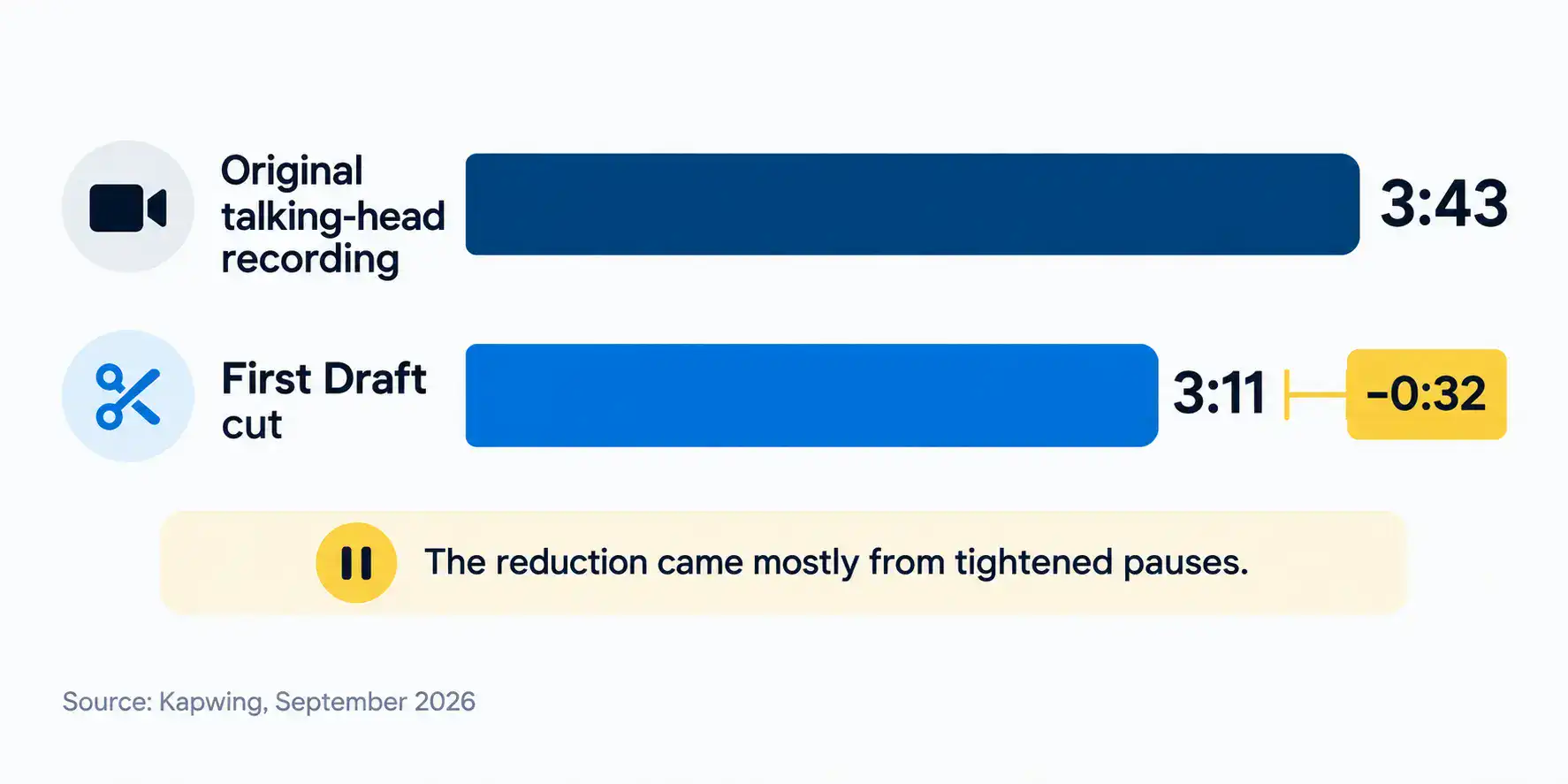
The telling detail: when Kapwing scrambled the clips before running the test, First Draft largely kept the scrambled order.
That confirms the boundary. First Draft cleans and trims; it does not decide which moment matters or rebuild a sequence.
Choosing highlights and ordering a story remains editorial judgment, and that stays with your people.
So when you plan an organic Reel that leans on pacing rather than structure, First Draft can do useful work.
When the Reel depends on picking the right ten seconds from five minutes, a human still makes that call.
Performance note: Instagram showed one demo where nearly five minutes of footage was condensed to a 17-second Reel. That is a single demonstration, not a typical output for every footage set or account.
Which Reel Types Belong Where
The fastest way to route Reels is by type, because type usually predicts how much editorial judgment the cut needs. Talking-head advice and day-in-the-life footage tolerate automated trimming well: the clip order is roughly fixed and the structure is casual.
An event or behind-the-scenes montage works too, since the sequence is already chronological and cleanup just improves pacing.
Creator and employee-filmed clips that mainly need pause cleanup are also strong fits.
The brand risk is low, the edits are reversible, and a quick review before publishing is enough of a safety net.
If those creator clips arrive inconsistent, our influencer marketing team can standardize delivery before footage reaches your triage step.
The other end of the table is where First Draft stops helping. An organic Reel that requires selecting the best moments from long footage needs an editor, because First Draft preserves clip order and will not choose highlights for you.
Light graphics or a logo placement also push a Reel into editor territory, since brand elements go on manually.
Hero creative, launch campaigns, and paid advertising all belong in a production pipeline, where story construction, brand review, and compliance checks happen before anything ships.
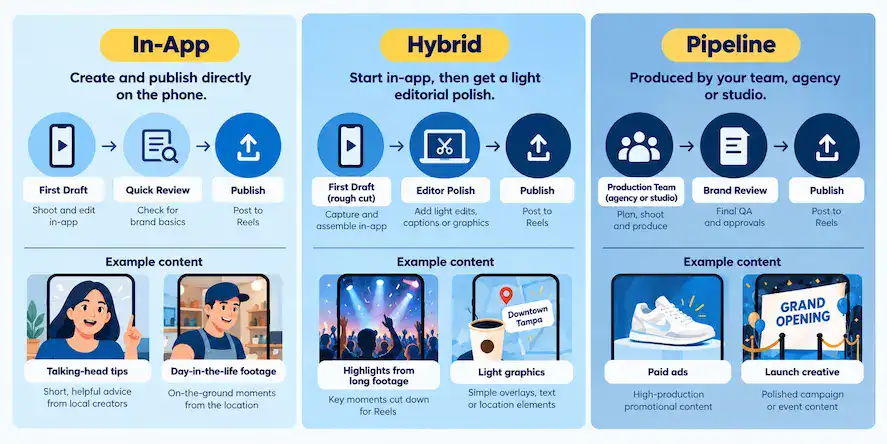
| Reel Type | First Draft Fit | Why | Route |
|---|---|---|---|
| Talking-head tips or advice | Strong | Pause removal tightens delivery; clip order is usually fixed | In-app |
| Day-in-the-life or lifestyle footage | Strong | Casual structure tolerates automated trimming | In-app |
| Event or behind-the-scenes montage | Strong | Chronological sequence; cleanup improves pacing | In-app |
| Creator or employee clips needing pause cleanup | Strong | Low brand risk; reversible edits | In-app |
| Highlights from long footage | Needs editor | First Draft preserves original clip order, so selection is a human call | Hybrid |
| Light graphics or logo placement needed | Needs editor | Brand elements must be placed manually | Hybrid |
| Organic Reel that may be boosted | Needs editor | Boosted content raises brand-risk level | Hybrid |
| Hero or launch creative | Not a fit | Story and brand direction require editorial judgment | Pipeline |
| Paid advertising | Not a fit | Paid placement requires brand review and compliance | Pipeline |
| Story restructuring or narrative arc | Not a fit | First Draft does not reorder clips or build narrative | Pipeline |
How First Draft Compares to Other Automated-Cut Tools
Automated cutting is not new. CapCut Auto Cut is AI-powered and analyzes video and audio to build cuts, including rhythm- and speech-based edits, and it lives in CapCut’s own app and desktop tools.
Adobe Quick Cut uses AI to combine clips based on a prompt, producing a rough cut as a starting point inside Adobe’s editing tools.
First Draft’s distinction is where it sits: right inside the Instagram Reels editor, on iPhone, with no export step and no separate app.
That placement is the whole point for a brand team. If your creators already work in CapCut or Adobe, an in-app option removes a round trip.
When you want higher-end output than any auto-cut tool delivers, our social content production team handles it.
| Tool | Where It Lives | What It Automates | What It Does Not Do | Typical Use Case |
|---|---|---|---|---|
| Instagram First Draft | Inside Instagram Reels editor (iPhone) | Trims clips and removes pauses to produce a reversible rough cut | Highlight selection, clip reordering, graphics, AI features | Quick rough cut for organic Reels without leaving Instagram |
| CapCut Auto Cut | CapCut app and desktop | AI-powered analysis of video and audio for automated cuts including rhythm- and speech-based editing | Brand review | Automated cut for creators editing outside Instagram |
| Adobe Quick Cut | Adobe’s editing tools | Uses AI to combine clips based on a prompt into a rough cut as a starting point | Final edit or branding | Starting point for creators already working in Adobe’s editing tools |
This table covers workflow placement and documented capabilities as of publication, not head-to-head performance benchmarks. No controlled comparison data is available across all three tools.
Where Should This Reel Be Made? (Interactive Checker)
Pick one Reel you are actually planning this week and run it through the checker below. Four questions cover the variables that decide routing: what your footage looks like, what editing it needs, where it will run, and what brand elements it requires.
Each answer maps to a letter. A answers point to in-app creation with First Draft. B answers point to a hybrid workflow where First Draft gives you a rough cut and an editor finishes it. C answers point to your production pipeline.
The most-picked letter wins, and a tie resolves to the later letter, so a B-versus-A tie lands on B. It turns the framework above into a single answer for your specific case.
Where Should This Reel Be Made?
Think of one specific Reel you’re planning. Answer each question and walk away with a routing decision.
Question and outcome reference
- What does your footage look like?
- Someone talking to camera
- A mix of casual clips
- A planned shoot or structured production
- What editing does this Reel need?
- Mainly removing filler pauses
- Picking the best moments from longer footage
- Building a story, narrative arc, or advertisement
- Where will this Reel run?
- Organic only
- Organic, but may be boosted later
- Paid placement or a major launch
- What brand elements does it need?
- Captions only
- Light graphics or a logo placement
- Full brand review and motion graphics
- Send it to your production pipeline.
This Reel needs editorial judgment, brand review, or paid-placement standards that First Draft is not designed to provide. Route it to your editor, agency, or studio from the start.
Your answers indicate structured production, narrative construction, paid distribution, or full brand review. Bringing First Draft into this workflow adds a step without adding capability.
- First Draft rough cut, then editor polish.
First Draft can save setup time by cleaning pauses and assembling a starting point. Hand the output to an editor for highlight selection, clip ordering, or light brand work.
Your answers show a mix of signals. First Draft gets you a tightened starting point faster than manual assembly, but an editor still needs to make the judgment calls your footage or placement requires.
- First Draft, then publish after a quick review.
This Reel is a good fit for in-app creation with First Draft. Use the pre-publish check from the Reels Production Triage Sheet before it goes live.
Your answers point to talking-head or casual footage that mainly needs pause cleanup for organic distribution with no brand work beyond captions. First Draft handles that without leaving Instagram.
The Three Routing Outcomes and What Each Requires
Each checker result maps to a different operating path, and knowing what each demands lets you brief coordinators and creators without reviewing every Reel yourself.
Result A: First Draft, then publish after a quick review
Talking-head tips, day-in-the-life footage, event montages, and employee clips needing pause cleanup qualify here.
Before it goes live, check pacing, clip order, and caption accuracy, then publish.
Editor time is not needed because the structure was already set and the edits are reversible if something looks off.
Result B: First Draft rough cut, then editor polish
Use this when First Draft saves setup time but the Reel still needs a human.
Highlight selection from long footage, clip reordering, or light branding all require editorial judgment.
Let First Draft assemble a tightened starting point, then hand that output to an editor to choose moments and place any graphics or logo.
Result C: Send it to your production pipeline
Paid advertising, hero creative, and launch campaigns belong here from the start.
These need brand review, compliance checks, and story construction that First Draft is not designed to provide.
Bypassing a proper pipeline for a paid placement risks the brand and the ad standard, so route the project to your content production team, agency, or studio before First Draft ever enters the picture.
Handing the Rules to Your Team
You do not route every Reel personally, and you should not have to.
The Reels Production Triage Sheet puts the routing table and the pre-publish check on one page so a coordinator or creator can make the call the way you would.
The sheet does two jobs.
First, it tells whoever films or routes footage whether a Reel goes straight to First Draft, to an editor after First Draft, or directly to production.
Second, its pre-publish check acts as a quality gate on any First Draft cut: pacing, clip order, caption accuracy, brand elements, and publishing device all get confirmed before the Reel goes live.
That second job protects your standards once more people are making organic Reels without you in the loop.
Downloadable resource
Reels Production Triage Sheet
PDF – 15.0 KB – Cheatsheet
Frequently Asked Questions
The Bottom Line
First Draft lets you make more Reels without adding editor hours, but only for the Reels that were already low-risk and lightly structured. Route talking-head tips, day-in-the-life clips, and montages through it with a quick review.
Send highlight-heavy or lightly branded organic Reels to an editor after the rough cut.
Keep paid advertising and launch creative in your production pipeline.
Run your next planned Reel through the checker, then hand the Reels Production Triage Sheet to your team so those calls happen the same way every time, without landing back on your desk.